An open-source, HIPAA-eligible Twilio alternative
GitHub repo: https://github.com/VectorlyApp/open-telephony-stack
For the most up-to-date setup instructions, please refer to open-telephony-stack/README.md.
Background
Today, we're open-sourcing our telephony stack: production-grade, HIPAA-eligible VoIP infrastructure for AI voice agents. We've since moved on to other projects, but as AI voice agent companies keep multiplying, we think this fills a gap: there's no comprehensive, open-source, self-hostable option for this. Now there is. The only real cost is running the Dockerized servers.
Here's why we built it. Last summer, we were building AI voice agents for healthcare practices. We needed to make and receive calls, stream audio in real-time, and stay HIPAA-eligible. Twilio seemed like the obvious choice, until we hit the paywall: $2,000/month for HIPAA compliance before you've made a single call. (The package included things like longer audit log retention. Sorry, not impressed. That's monopoly pricing.) For a startup, those figures can be prohibitive.
So, we built our own stack: Asterisk (an open-source PBX), AWS Chime SDK (for SIP trunking and phone numbers), and a FastAPI shim that bridges old-school telephony to modern WebSocket APIs.
Below, I'll walk through the architecture and setup.
What this is
A complete and secure telephony system built to handle both inbound and outbound calls:
- Receives calls via AWS Chime Voice Connector (you get a real phone number).
- Terminates SIP/TLS on Asterisk running in Docker.
- Bridges the audio via RTP to a WebSocket connection.
- Streams base64 μ-law audio to your AI voice server.
- Twilio-like API (the WebSocket interface is modeled after Twilio's Media Streams API, so if you've built with Twilio before, you'll feel right at home).
You bring your own AI. This just handles the phone infrastructure.
Who this is for
Use case examples:
- Building voice AI in healthcare and need HIPAA compliance without Twilio's BAA costs.
- Customizing call handling in ways Twilio doesn't allow.
- Wanting full control over your telephony stack.
- Learning how telephony infrastructure works and building a VoIP stack from scratch.
Consider alternatives if:
- You just need basic voice for a side project (Twilio is easier).
- You don't want to manage infrastructure.
- You don't have any special compliance needs.
Infrastructure requires time and maintenance. That's the trade-off.
Architecture
Overview
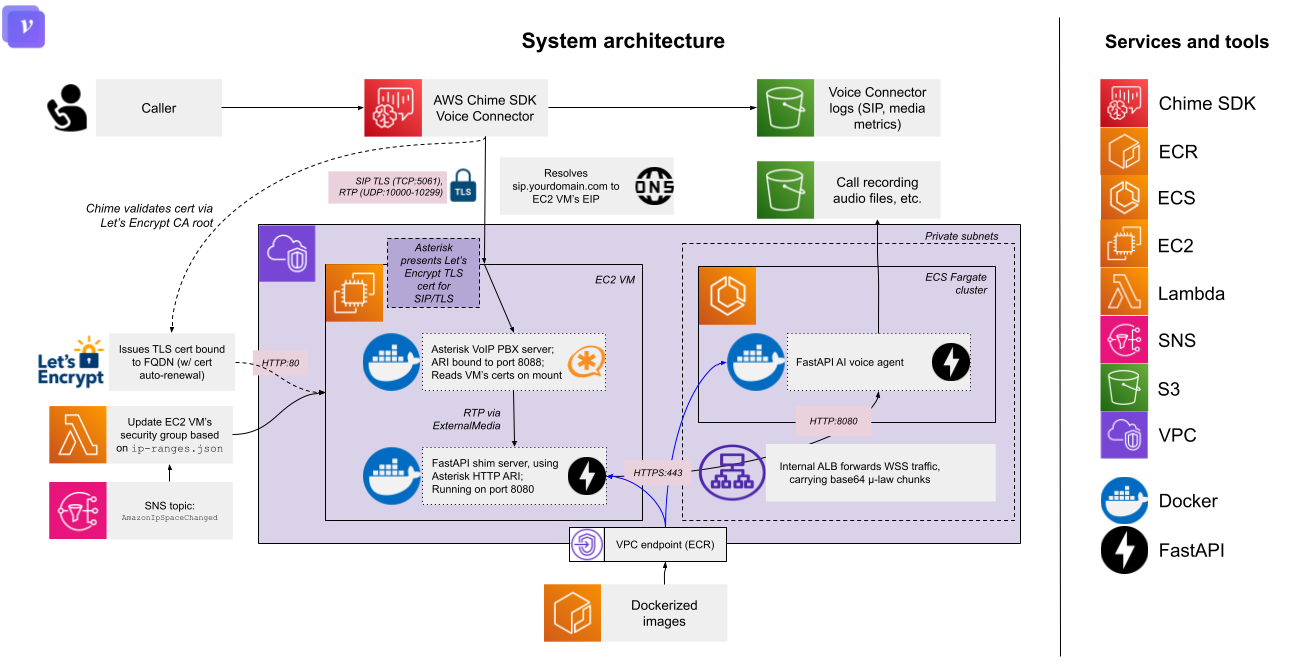
Port reference
| Service | Port | Protocol | Description |
|---|---|---|---|
| Asterisk SIP | 5061 | TCP/TLS | SIP signaling with AWS Chime |
| Asterisk ARI | 8088 | HTTP | Asterisk REST Interface (localhost only) |
| Shim server | 8080 | HTTP | FastAPI server, health endpoints |
| RTP media | 10000-10299 | UDP | Audio streams to/from Asterisk |
Components
AWS Chime Voice Connector: The PSTN gateway. You provision a phone number here. Chime handles the carrier relationships, E911, etc. Calls arrive as SIP/TLS on port 5061.
Asterisk PBX: Open-source telephony server, Dockerized. Handles SIP signaling, RTP media, call routing. The key here is using ARI (Asterisk REST Interface) instead of traditional dialplan scripting.
Shim server: A FastAPI application that:
- Connects to Asterisk via ARI WebSocket
- Creates
ExternalMediachannels for RTP bridging (the "external media" here being your AI voice agent server) - Maintains a perfect 20ms RTP cadence regardless of WebSocket jitter
- Forwards audio as base64 μ-law to your downstream voice server
Your AI voice server: Whatever you're building. Receives WebSocket connection with Twilio-compatible media events. Could be OpenAI Realtime, AWS Nova Sonic, a custom ASR/TTS pipeline, whatever.
- We've included a sample implementation: open-telephony-stack/src/servers/voice_agent_server.py.
DNS configuration
Before setting up TLS certificates, you need to configure DNS so that AWS Chime can resolve your Asterisk server's hostname. Create an A record pointing your SIP subdomain to your EC2 instance's Elastic IP:
| Record type | Name | Value | TTL |
|---|---|---|---|
| A | sip.yourdomain.com | Your Elastic IP (e.g., 54.123.45.67) | 300 (or default) |
This DNS record must be in place before:
- Requesting Let's Encrypt certificates (Certbot validates domain ownership)
- Configuring AWS Chime Voice Connector termination (Chime needs to resolve the hostname)
- Setting
external_signaling_addressinpjsip.conf(must match the DNS name)
After creating the record, wait for DNS propagation (usually a few minutes, but can take up to 48 hours depending on TTL). You can verify with:
 bash
bashA note on TLS certificates
AWS Chime requires TLS for SIP. This setup uses Let's Encrypt to meet that requirement:
- Certbot runs on the EC2 instance, bound to port 80.
- Certificates are issued for your SIP domain (e.g.,
sip.yourdomain.com). - Asterisk reads certs from
/etc/letsencrypt/live/...via Docker volume mount. - A renewal hook reloads Asterisk when certs rotate.
- Chime validates the cert against Let's Encrypt's CA root.
This means no self-signed certs, no manual renewal, no cert expiration surprises.
Call flow
Here's what happens when someone calls your number:
- Caller dials your AWS Chime phone number
- Chime sends SIP INVITE to your Asterisk server (TLS:5061)
- Asterisk matches the call in
extensions.confAnswer()Stasis(voice-agent)
- ARI sends
StasisStartevent to shim server via WebSocket - Shim server:
- Opens WebSocket to your voice server
- Creates ARI mixing bridge
- Adds PSTN channel to bridge
- Allocates UDP port for RTP (10000-10299); each live call gets its own port
- Creates
ExternalMediachannel pointing to that port - Adds
ExternalMediachannel to bridge
- Audio flows: PSTN ↔ Bridge ↔
ExternalMedia↔ Shim (RTP) ↔ Voice Server (WSS) - Caller hangs up (or AI ends call via a tool call)
- ARI sends
ChannelHangupRequest/ChannelDestroyed - Shim cleans up: closes WebSocket, deletes bridge, releases port
Asterisk server
The Asterisk server config files live in deployment/asterisk-server/asterisk-config/. The Docker container mounts this directory.
pjsip.conf: SIP trunk configuration
This is the most important file. It configures the SIP trunk to AWS Chime, including transport settings, TLS certificates, inbound/outbound endpoints, and where to route calls.
Notes:
external_signaling_addressmust match your DNS and certificatelocal_nettells Asterisk what's "inside" vs "outside" for NAT handlingverify_server=nobecause Chime doesn't send a client cert we need to validate- The cert/key files are what Asterisk presents to Chime during TLS handshake
extensions.conf: Dialplan
Defines what happens when calls arrive or are placed. This is a minimal dialplan; everything interesting happens in the Stasis application.
The Stasis(voice-agent) line is the magic. It moves the call from traditional dialplan processing into ARI, where our shim server takes over.
ari.conf: REST API access
Configures the Asterisk REST Interface credentials. The shim server uses these to connect to ARI.
http.conf: HTTP server for ARI
Configures Asterisk's built-in HTTP server, which hosts the ARI endpoints. Bound to localhost only for security; the shim server runs on the same machine.
rtp.conf: RTP port range
Defines the UDP port range for RTP media streams. Each call uses one port from this range (10000 - 10299).
300 ports = 300 concurrent calls max. Adjust based on your needs.
modules.conf: Loaded modules
Specifies which Asterisk modules to load at startup. We explicitly load only what we need: PJSIP for SIP, ARI for programmatic control, and the μ-law codec for audio.
Setup guide
Prereqs:
- AWS account
- EC2 instance (recommended
t3.mediumminimum, Amazon Linux 2023) - Elastic IP (attached to the EC2 VM; Chime Voice Connectors require static IP addresses)
- Domain name with DNS pointing to the Elastic IP
- Docker and Docker Compose
1. Provision AWS Chime Voice Connector
- Go to AWS Chime SDK console
- Create a Voice Connector
- Under "Phone numbers," claim or port a number
- Under "Termination," add your Asterisk server's domain and IP
Under "Origination," configure where to send inbound calls:
- Host:
sip.yourdomain.com - Port:
5061 - Protocol:
TLS
- Host:
- Note your Voice Connector hostname (for
pjsip.conf)
2. Set up TLS certificates
bash3. Configure security groups
Allow inbound traffic only from AWS Chime IPs:
| Port | Protocol | Source | Description |
|---|---|---|---|
| 22 | TCP | Your IP | SSH |
| 80 | TCP | 0.0.0.0/0 | Let's Encrypt ACME challenge |
| 5061 | TCP | AWS Chime IPs | SIP/TLS |
| 10000-10299 | UDP | AWS Chime IPs | RTP media |
The repo includes a Lambda function that automatically updates your security group when AWS publishes new IP ranges. Specifically, this is for their AMAZON, EC2, and CHIME_VOICECONNECTOR services.
4. Deploy Asterisk server
The Docker compose here uses the mlan/asterisk Dockerized Asterisk image, which is one of the dockerized versions of Asterisk. For additional customizability (e.g., specific module selection, custom build flags, or different base images), you can build your own Docker image using the Asterisk GitHub repository.
bash5. Deploy shim server
bash6. Test Asterisk server
Call your AWS Chime phone number. Watch the logs:
bashYou should see:
- SIP INVITE received
CallSessioncreatedExternalMediachannel established- RTP flowing
- WebSocket connection to your voice server
7. Implement your AI voice server
The WebSocket API is modeled after Twilio's Media Streams. If you've integrated with Twilio before, this will look familiar: same event structure, same audio format.
We've included a sample implementation: voice_agent_server.py. This demonstrates how to handle the WebSocket events and process audio in real-time.
Audio format specs:
- Format: μ-law (PCMU)
- Sample rate: 8000 Hz
- Frame size: 160 bytes (20ms)
- Encoding: Base64
Key WebSocket events:
Start event (shim → voice server):
 JSON
JSONMedia event (bidirectional):
JSONClear event (voice server → shim) - clears the audio buffer immediately for barge-in / interruption handling:
JSONMark event (bidirectional) - used for tracking audio playback position:
JSONStop event (either direction) - ends the call:
JSON